


Bluebeam Revu 21.9 Update
Bluebeam has just released the new Revu 21.9 update! While there may not be any new features included in this update, there are plenty of important fixes here. If you’ve experienced any of the issues listed below, I strongly suggest you download this update right away.

Revu 21.9
3 March 2026
What’s Fixed
- Printing to the Bluebeam PDF printer could cause other open instances of Revu to close unexpectedly.
- Links to PDF files wouldn’t open correctly in the Web tab.
- When polyline editing, control points didn’t respond correctly when using modifier keys.
- File names in footers could change when converting Word documents to PDF using Stapler.
- Restored expected behavior for temporarily disabling Snap to Grid using keyboard shortcuts with certain tools.
- The Import Icon option was unavailable in Tool Sets.
- Revu could become unresponsive when working with custom line styles and adjusting the Properties panel.
- Some custom sequences couldn’t be resumed.
- Polygon Cutout didn’t work properly on areas with curved segments.
- Some images in PDFs didn’t render correctly on ARM64 devices.
- Markups didn’t snap to grid correctly after rotating a PDF when using certain regional settings.
- Additional improvements and fixes.
For more information, please see Bluebeam’s Release Notes page.
Checking for an Update
Need to be sure your Revu 21 is using the latest version? Here’s an easy way to find out:
- Open and sign in to Revu.
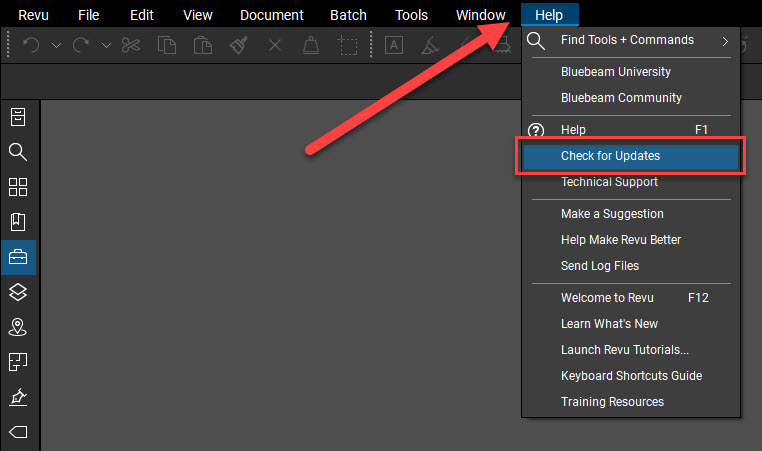
- Go to Help > Check for Updates. If updates are available, the Update Review dialog appears containing release notes for the latest version.
- Select Download.
- Select Install and follow the on-screen prompts to save your work or to close any running applications (if necessary).
- From the InstallShield dialog, select Install.
- After the installation completes, select Finish.
For more info on updating Revu 21, check out Bluebeam’s Technical Support Page.


Leave A Comment