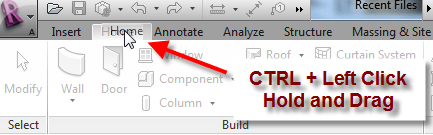
Did you know you can reorganize the Tabs on the Revit Ribbon?
- Move your mouse over the tab you wish to move.
- Hold down the CTRL key on the keyboard and left click/hold the Revit Ribbon tab you wish to move.
- Drag the tab to it’s new location!
Seiler's Autodesk & Bluebeam business has been acquired by MicroCAD (Press Release) Dismiss
Skip to contentDid you know you can reorganize the Tabs on the Revit Ribbon?

Seiler Design Solutions’ Autodesk & Bluebeam businesses have recently been acquired
by MicroCAD Training & Consulting, a leading Autodesk Platinum partner.
For those needing Autodesk or Bluebeam assistance, visit microcad3d.com
To continue to use the Design Solutions website, close this popup.
Read the full press release here: https://gotoseiler.com/4cZq4Hj

Leave A Comment